 HueWalls
Running MOSS-Image on a Mac with ComfyUI: a working setup, two traps and real timings
How we got MOSS-Image running on an M4 Max Mac with ComfyUI: the int8 files that work, a trap each from the w4a8 encoder and the er_sde sampler, a trimmed workflow JSON and real timings.
MOSS-Image is an open-source text-to-image model released on 16 October 2026: a 5B-parameter DiT with a Qwen3.5 text encoder and the FLUX.2 VAE, listed as Apache 2.0 on its model page. We wanted to know whether it runs on a Mac, so we can use it for wallpapers on HueWalls.
Short answer: yes, but not by pressing Run on the official workflow. You need to swap the text encoder, switch off prompt expansion and change the sampler from er_sde to euler. With that, a 928×2016 phone-size image at 25 steps takes about 8.5 minutes on an M4 Max. Below is what we did, in the order we hit things. Every number comes from our own machine, and anything we ran only once or did not test is marked as such.
The combination that works
| Item | Version |
|---|---|
| Machine | Mac, M4 Max, 64 GB unified memory |
| OS | macOS 15.3 |
| ComfyUI | 0.42.5 (MOSS nodes are already built in, no upgrade needed) |
| Python / PyTorch | 3.13.12 / 2.12.1 (MPS) |
Three model files, from the Hugging Face repo Comfy-Org/MOSS-Image (the split weights ComfyUI uses):
| File | Goes in | Size | Notes |
|---|---|---|---|
moss_image_sft_int8_convrot.safetensors |
models/diffusion_models/ |
5.04 GiB | Main model |
qwen3.5_9b_int8_convrot.safetensors |
models/text_encoders/ |
9.08 GiB | Text encoder; use this version on a Mac |
flux2-vae_small.safetensors |
models/vae/ |
0.23 GiB | VAE (the full flux2-vae gave the same result) |
Set the CLIPLoader type to moss_image. Sampling: 25 steps, CFG 2.5, sampler euler, scheduler simple. The official template defaults to er_sde; the reason is further down.
First trap: the w4a8 encoder in the official workflow
The official workflow loads qwen3.5_9b_w4a8_gptq (6.84 GiB) as the text encoder and turns prompt expansion on by default: the same Qwen3.5 acts as a language model and rewrites your short prompt into a long English description before generation. On a Mac this goes nowhere. We tried it both ways:
- On the CPU (ComfyUI's default). We read the function in
comfy/model_management.pythat picks the text-encoder device: without--gpu-only, the check usually fails on MPS and the encoder lands on the CPU. It runs, but painfully slowly. We measured it with a similar w4a8 encoder (the FLUX 3 prompt upsampler): 19 tokens took 4 min 26 s, 13 to 16 seconds per token, with a cap of 3584 tokens, so well over 13 hours. MOSS's w4a8 encoder uses the same quantisation, but we did not run its expansion to the end. - On the GPU (
--gpu-only). It fails straight away, in 3.6 seconds:Trying to convert Float8_e4m3fn to the MPS backend but it does not have support for that dtype. The failing node was the plain CLIPTextEncode for the negative prompt, so switching expansion off does not help; any w4a8 encoder on the GPU hits it. Our reading is that w4a8 needs float8 scaling factors to unpack its weights and MPS has no float8. That is an inference; we did not read the quantisation code to confirm it.
The fix: the same repo also has qwen3.5_9b_int8_convrot, the same Qwen3.5 9B in int8 (the same kind of quantisation our local Qwen workflow already uses). It loads and runs normally on MPS. We also switched prompt expansion off and write the English prompt ourselves. Our launch arguments no longer include --gpu-only.
The price is losing expansion. The system prompt built into the official workflow asks for a 220 to 320 word description for a single-subject scene, so without expansion you have to write detailed prompts yourself. We did not measure how much quality that costs.
Second trap: a black image at 25 steps, and the sampler is to blame
With the int8 encoder in place, the first 25-step run produced a completely black image. We ruled things out one by one:
| Test | Result |
|---|---|
| Text-encoder output | Fine, no NaN (rules out fp16 overflow) |
| Full-size VAE instead | Still black (rules out the VAE) |
er_sde, 2 steps |
An image, but very blurry |
er_sde, 6 steps |
Fine, a complete image |
er_sde, 25 steps |
Completely black |
euler, 25 steps |
Fine: pixel range 0 to 255, mean 66, 267 seconds |
So on our Mac (MPS), er_sde produces numerical errors once the step count gets high enough and the output turns black, while euler does not. The fix is only to change the sampler in the workflow; no launch argument is involved. We did not dig into why er_sde breaks and have not reproduced it on another machine, so read this as "on this machine".
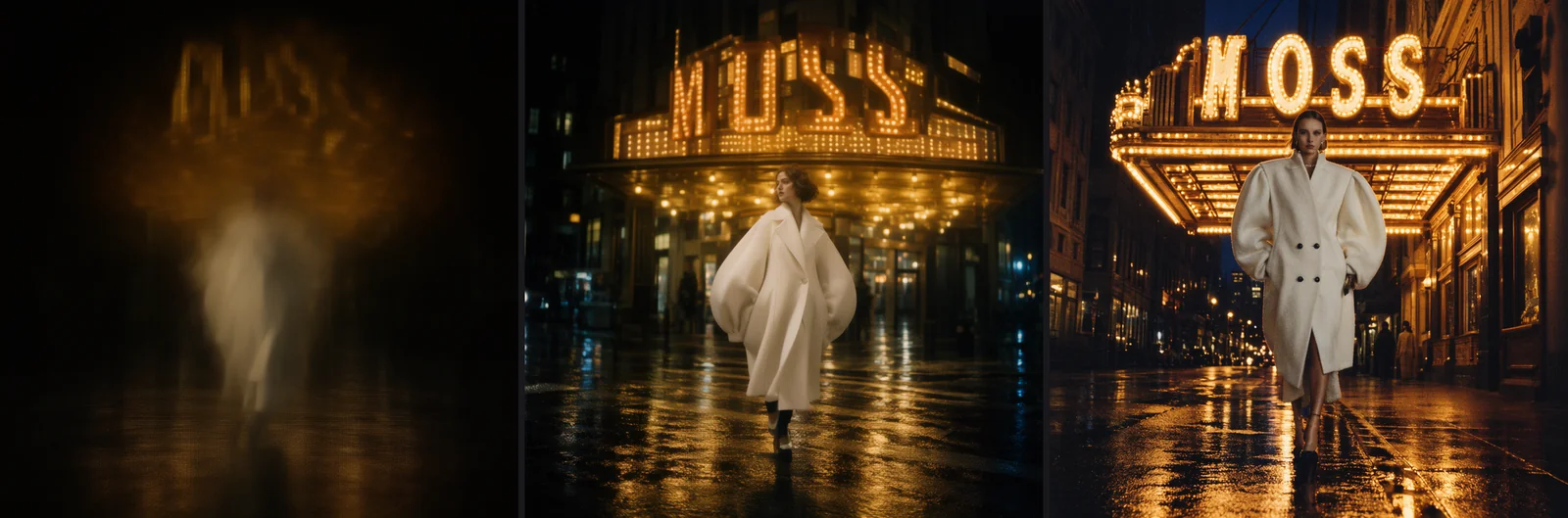
Same prompt, same seed (452138030585152). Left and middle: er_sde at 2 and 6 steps. Right: euler at 25 steps.
The final workflow
Here is the trimmed API-format workflow: prompt expansion and skip-layer guidance removed, leaving load, encode, sample, decode, save. Save it as moss_api.json and you can submit it straight to a local ComfyUI. While writing this article we ran it once more at 928×2016 with 6 steps to confirm it produces an image (160 seconds).
{
  "9": {
    "class_type": "SaveImage",
    "inputs": {
      "filename_prefix": "moss",
      "images": [
        "8",
        0
      ]
    }
  },
  "1": {
    "class_type": "UNETLoader",
    "inputs": {
      "unet_name": "moss_image_sft_int8_convrot.safetensors",
      "weight_dtype": "default"
    }
  },
  "2": {
    "class_type": "CLIPLoader",
    "inputs": {
      "clip_name": "qwen3.5_9b_int8_convrot.safetensors",
      "type": "moss_image",
      "device": "default"
    }
  },
  "3": {
    "class_type": "VAELoader",
    "inputs": {
      "vae_name": "flux2-vae_small.safetensors"
    }
  },
  "4": {
    "class_type": "CLIPTextEncode",
    "inputs": {
      "text": "",
      "clip": [
        "2",
        0
      ]
    }
  },
  "5": {
    "class_type": "CLIPTextEncode",
    "inputs": {
      "text": "nsfw, worst quality, bad anatomy, watermark, jpeg artifact",
      "clip": [
        "2",
        0
      ]
    }
  },
  "6": {
    "class_type": "EmptyFlux2LatentImage",
    "inputs": {
      "width": 928,
      "height": 2016,
      "batch_size": 1
    }
  },
  "7": {
    "class_type": "KSampler",
    "inputs": {
      "seed": 1,
      "steps": 25,
      "cfg": 2.5,
      "sampler_name": "euler",
      "scheduler": "simple",
      "denoise": 1.0,
      "model": [
        "1",
        0
      ],
      "positive": [
        "4",
        0
      ],
      "negative": [
        "5",
        0
      ],
      "latent_image": [
        "6",
        0
      ]
    }
  },
  "8": {
    "class_type": "VAEDecode",
    "inputs": {
      "samples": [
        "7",
        0
      ],
      "vae": [
        "3",
        0
      ]
    }
  }
}
The submit script only changes a few fields (node 4 is the prompt, 6 the size, 7 the seed and steps, 9 the filename prefix):
import json, random, time, urllib.request

HOST = "http://127.0.0.1:8188"

def call(path, body=None):
    req = urllib.request.Request(HOST + path, data=json.dumps(body).encode() if body is not None else None,
                                 headers={"Content-Type": "application/json"})
    return json.load(urllib.request.urlopen(req, timeout=30))

wf = json.load(open("moss_api.json"))
wf["4"]["inputs"]["text"] = "A rainy night in a narrow city alley lit by pink and blue neon, ..."  # positive prompt
wf["6"]["inputs"].update(width=928, height=2016)                       # multiples of 16
wf["7"]["inputs"].update(seed=random.randint(1, 2**50), steps=25)      # keep sampler_name = euler
wf["9"]["inputs"]["filename_prefix"] = "moss_demo"

pid = call("/prompt", {"prompt": wf, "client_id": "demo"})["prompt_id"]
while pid not in (hist := call("/history")):
    time.sleep(10)
print(hist[pid]["status"]["status_str"], [i["filename"] for o in hist[pid]["outputs"].values() for i in o.get("images", [])])
The sizes we used all have width and height as multiples of 16: 1024×1024, 928×2016 and 1600×896. We did not try others.
How long it takes
| Size | Steps | Sampler | Submit to image | Notes |
|---|---|---|---|---|
| 1024×1024 | 25 | euler |
267 s | One run |
| 1024×1024 | 6 | er_sde |
about 66 s | One run |
| 928×2016 | 25 | euler |
513 s (about 8.6 min) | Phone portrait, one run |
| 928×2016 | 6 | euler |
160 s | Workflow check, one run |
| 1600×896 | 25 | euler |
370 s | This article's cover, one run |
Each row is a single run, with no averaging, so treat these as orders of magnitude. Compared with the FLUX 3 Klein timings in our other write-up (about 9 to 10 minutes for a phone-size image at 30 steps, see Running FLUX 3 Klein on a Mac with ComfyUI), the speed is in the same range.
What it produced: reliable text, unreliable people
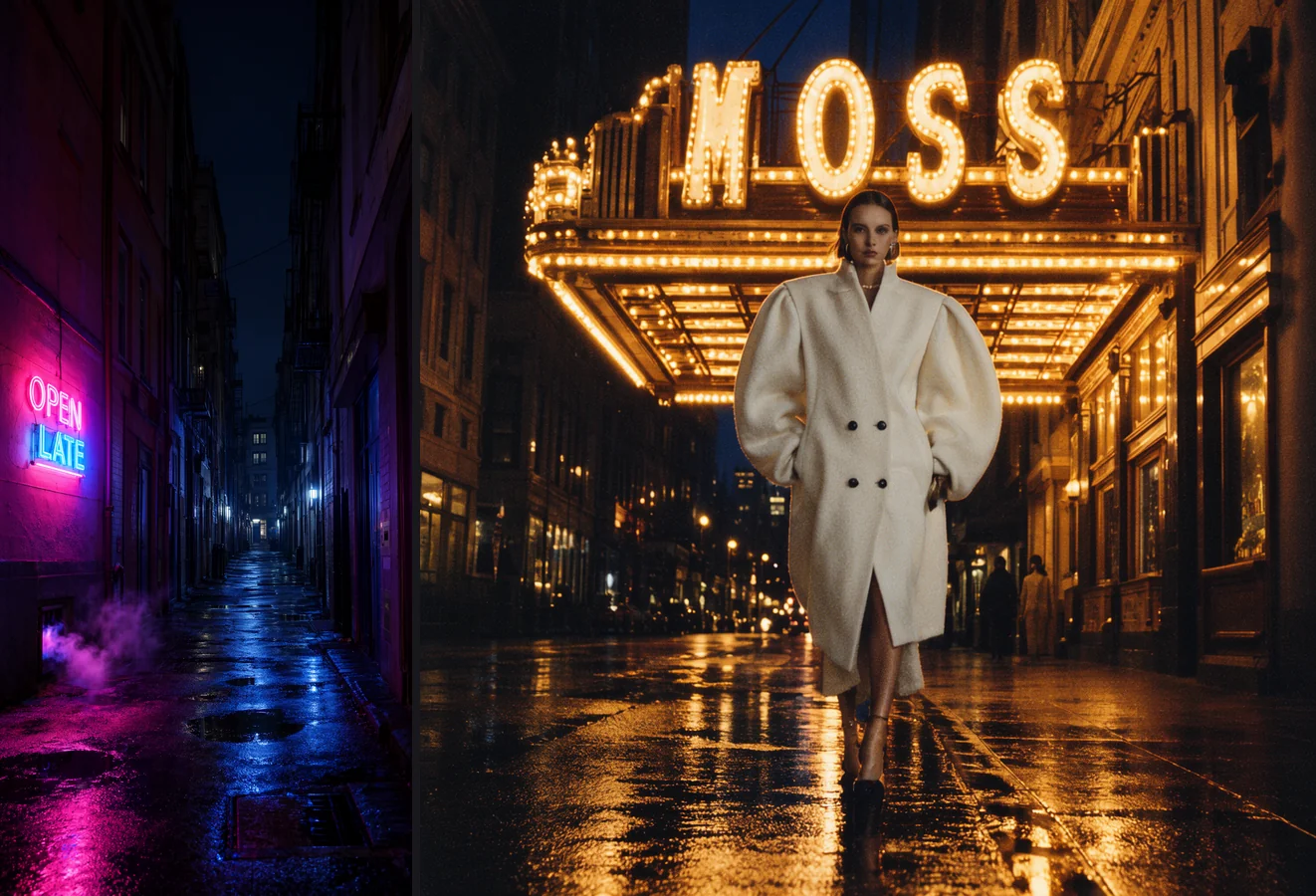
Left: 928×2016, 25 steps, prompt below. Right: 1024×1024, 25 steps, seed 452138030585152.
Our impressions:
- Text is reliable. At 25 steps both
OPEN LATEin the alley andMOSSon the marquee came out spelled correctly. At 6 steps it breaks down: in the 928×2016 run,OPEN LATEappeared twice and the second one was cut off. - Scenes and light are good. The pink and blue neon reflecting on wet ground and the warm film-like bulbs both work, and the alley leaves clean night sky at the top, which suits a phone lock-screen clock.
- Overall a bit dark, with soft texture. The wall on the left of the alley lacks detail. Dark tones are not a problem on an OLED phone, but up close it looks flat.
- People are unreliable. In the right-hand image the face and upper body are fine, but the lower legs are thin and the shoes and coat hem do not hold together. So we plan to use MOSS for scenes without people only.
- Against the official Space, our impression is that the local version is darker and flatter. We compared it with images from the official Space (nearly the same prompt; the Space one had a few extra "avoid …" phrases). We called the Space with 50 steps, CFG 3 and skip layers set to layer 22; locally we ran 25 steps, CFG 2.5, no skip layers and an int8 quantisation. We have not tested which of these makes the difference.
The prompt for the alley image (about 70 words, no expansion):
A rainy night in a narrow city alley lit by pink and blue neon, a glowing neon sign on the lower half of the wall with the words OPEN LATE, wet asphalt reflecting the colourful lights, steam rising from a small vent, a few puddles, cinematic and moody, ultra detailed, the upper third a calm dark night sky between the buildings.
What we have not verified
- Prompt expansion. Whether the int8 encoder can run it on MPS, and how it looks, is untested.
- Why the quality gap exists. We did not run controlled tests on 50 steps, CFG 3 or skip-layer guidance.
- bf16 files. We did not download the bf16 main model (
moss_image_sft_bf16) or the bf16 encoder. - Size limits. Our largest run was 928×2016; we do not know whether bigger sizes hit an error as FLUX 3 does.
- Memory use, batch runs, other samplers. Not measured.
- Commercial terms. The model page says Apache 2.0; please check the original text yourself.
If you want a text-to-image model on a Mac with dependable text rendering that fits into a batch workflow, MOSS is usable, but be patient: a phone image takes eight or nine minutes, and it is best kept to scenes.