 HueWalls
Running FLUX 3 Klein on a Mac with ComfyUI: models, workflow JSON, timings and problems
A reproducible record of running FLUX 3 Klein on an M4 Max Mac with ComfyUI: versions, model files, the working workflow JSON, real timings and every problem we hit.
This is a reproducible record of running FLUX 3 Klein on a Mac with ComfyUI: the exact versions, the three model files, the workflow JSON that works on Apple silicon, real timings and every problem we ran into. We use it to make the wallpapers on HueWalls. Everything below was measured on our own machine; where we only ran something once, or did not test it, we say so.
Our setup
| Item | What we used |
|---|---|
| Machine | Mac with Apple M4 Max, 64 GB unified memory |
| macOS | 15.3 |
| ComfyUI | 0.42.5 (desktop app). The official guide asks for 0.41.0 or later |
| Python / PyTorch | 3.13.12 / 2.12.1, MPS backend |
| Launch flags | --enable-assets --enable-manager, plus custom input and output folders. No --gpu-only |
The three model files
All three come from the gated Hugging Face repository black-forest-labs/flux-3-image-klein-comfy. You have to accept the license on that page before you can download. The weights are released under the FLUX Kommunity License, so read it yourself before using the output commercially.
| File | Put it in | Size on our disk | Role |
|---|---|---|---|
flux3-image-klein-base-int8-convrot.safetensors |
ComfyUI/models/diffusion_models/ |
5.41 GiB | The image model |
qwen3vl_4b_int8_convrot.safetensors |
ComfyUI/models/text_encoders/ |
4.52 GiB | Text encoder |
flux2-vae.safetensors |
ComfyUI/models/vae/ |
0.31 GiB | VAE |
The same page also lists a distilled checkpoint (flux3-image-klein-int8-convrot.safetensors, 4 to 16 steps, CFG 1) and a prompt upsampler (qwen3.5_9b_flux3_prompt_upsampler_w4a8.safetensors). We did not use either. The upsampler is the file behind the first problem in this post.
Sampling settings
| Setting | Value |
|---|---|
| Checkpoint | the base one (flux3-image-klein-base-int8-convrot) |
| Steps | 30 (the official guide suggests 50 for the base checkpoint; we did not compare the two) |
| CFG | 3.5 |
| Sampler / scheduler | euler / simple |
| Denoise, batch size | 1.0, 1 |
| Negative prompt | empty |
| Prompt enhancer | off |
| Text encoder loader | CLIPLoader with type flux3 |
The workflow JSON
This is the workflow that runs on our Mac. It is in ComfyUI's API format, the one the /prompt endpoint takes. We started from the official Klein template and removed the prompt-enhancer nodes. Node 18:17 holds the positive prompt, 18:6 the image size and 18:7 the sampler settings. We drive it through the HTTP API; we did not test importing this file through the ComfyUI interface.
{
  "9": {
    "inputs": {
      "filename_prefix": "flux3",
      "images": [
        "18:8",
        0
      ]
    },
    "class_type": "SaveImage",
    "_meta": {
      "title": "保存图像"
    }
  },
  "18:17": {
    "inputs": {
      "value": ""
    },
    "class_type": "PrimitiveStringMultiline",
    "_meta": {
      "title": "字符串(多行)"
    }
  },
  "18:1": {
    "inputs": {
      "unet_name": "flux3-image-klein-base-int8-convrot.safetensors",
      "weight_dtype": "default"
    },
    "class_type": "UNETLoader",
    "_meta": {
      "title": "UNet加载器"
    }
  },
  "18:4": {
    "inputs": {
      "text": [
        "18:17",
        0
      ],
      "clip": [
        "18:2",
        0
      ]
    },
    "class_type": "CLIPTextEncode",
    "_meta": {
      "title": "Positive Prompt"
    }
  },
  "18:2": {
    "inputs": {
      "clip_name": "qwen3vl_4b_int8_convrot.safetensors",
      "type": "flux3",
      "device": "default"
    },
    "class_type": "CLIPLoader",
    "_meta": {
      "title": "加载CLIP"
    }
  },
  "18:7": {
    "inputs": {
      "seed": 1,
      "steps": 30,
      "cfg": 3.5,
      "sampler_name": "euler",
      "scheduler": "simple",
      "denoise": 1.0,
      "model": [
        "18:1",
        0
      ],
      "positive": [
        "18:4",
        0
      ],
      "negative": [
        "18:5",
        0
      ],
      "latent_image": [
        "18:6",
        0
      ]
    },
    "class_type": "KSampler",
    "_meta": {
      "title": "K采样器"
    }
  },
  "18:3": {
    "inputs": {
      "vae_name": "flux2-vae.safetensors"
    },
    "class_type": "VAELoader",
    "_meta": {
      "title": "加载VAE"
    }
  },
  "18:6": {
    "inputs": {
      "width": 1008,
      "height": 2176,
      "batch_size": 1
    },
    "class_type": "EmptyFlux2LatentImage",
    "_meta": {
      "title": "空Latent图像(Flux2)"
    }
  },
  "18:5": {
    "inputs": {
      "text": "",
      "clip": [
        "18:2",
        0
      ]
    },
    "class_type": "CLIPTextEncode",
    "_meta": {
      "title": "Negative Prompt (empty = reference default)"
    }
  },
  "18:8": {
    "inputs": {
      "samples": [
        "18:7",
        0
      ],
      "vae": [
        "18:3",
        0
      ]
    },
    "class_type": "VAEDecode",
    "_meta": {
      "title": "VAE解码"
    }
  }
}
A minimal script that submits it and waits for the result (save the JSON above as flux3_klein_api.json):
import json, random, time, urllib.request

HOST = "http://127.0.0.1:8188"

def call(path, body=None):
    req = urllib.request.Request(HOST + path, data=json.dumps(body).encode() if body is not None else None,
                                 headers={"Content-Type": "application/json"})
    return json.load(urllib.request.urlopen(req, timeout=30))

wf = json.load(open("flux3_klein_api.json"))
wf["18:17"]["inputs"]["value"] = "A cozy window seat on a snowy evening, ..."   # positive prompt
wf["18:6"]["inputs"].update(width=1008, height=2176)                           # multiples of 16
wf["18:7"]["inputs"].update(seed=random.randint(1, 2**50), steps=30, cfg=3.5)
wf["9"]["inputs"]["filename_prefix"] = "flux3_demo"

pid = call("/prompt", {"prompt": wf, "client_id": "demo"})["prompt_id"]
while pid not in (hist := call("/history")):
    time.sleep(15)
print(hist[pid]["status"]["status_str"], [i["filename"] for o in hist[pid]["outputs"].values() for i in o.get("images", [])])
How long one image takes
| Size | Image tokens | Result | Time |
|---|---|---|---|
| 1008×2176 (phone) | 63 × 136 = 8,568 | Works | 561, 554 and 586 s in three runs |
| 1600×896 (16:9) | 100 × 56 = 5,600 | Works | 340 s (one run, the cover of this post) |
| 1728×1088 (desktop) | 108 × 68 = 7,344 | Works | about 480 s (one earlier run) |
| 2560×1600 (desktop) | 160 × 100 = 16,000 | Fails with an INT_MAX error | after more than 20 minutes (one earlier attempt) |
All runs use 30 steps and run one at a time. "Image tokens" is width ÷ 16 × height ÷ 16. From these runs, sizes up to about 9,000 image tokens work and 16,000 does not; we have not found the exact limit in between.
What it produced
Three phone-size results from the timed runs: Give Thanks (561 s), Thanksgiving (554 s) and a snowy window seat (586 s). The two with text were spelled correctly on the first try.

Left to right: Give Thanks, Thanksgiving, snowy window seat. 1008×2176, 30 steps, CFG 3.5.
A desktop-size run at 1728×1088, including a sign that reads Merry Christmas:
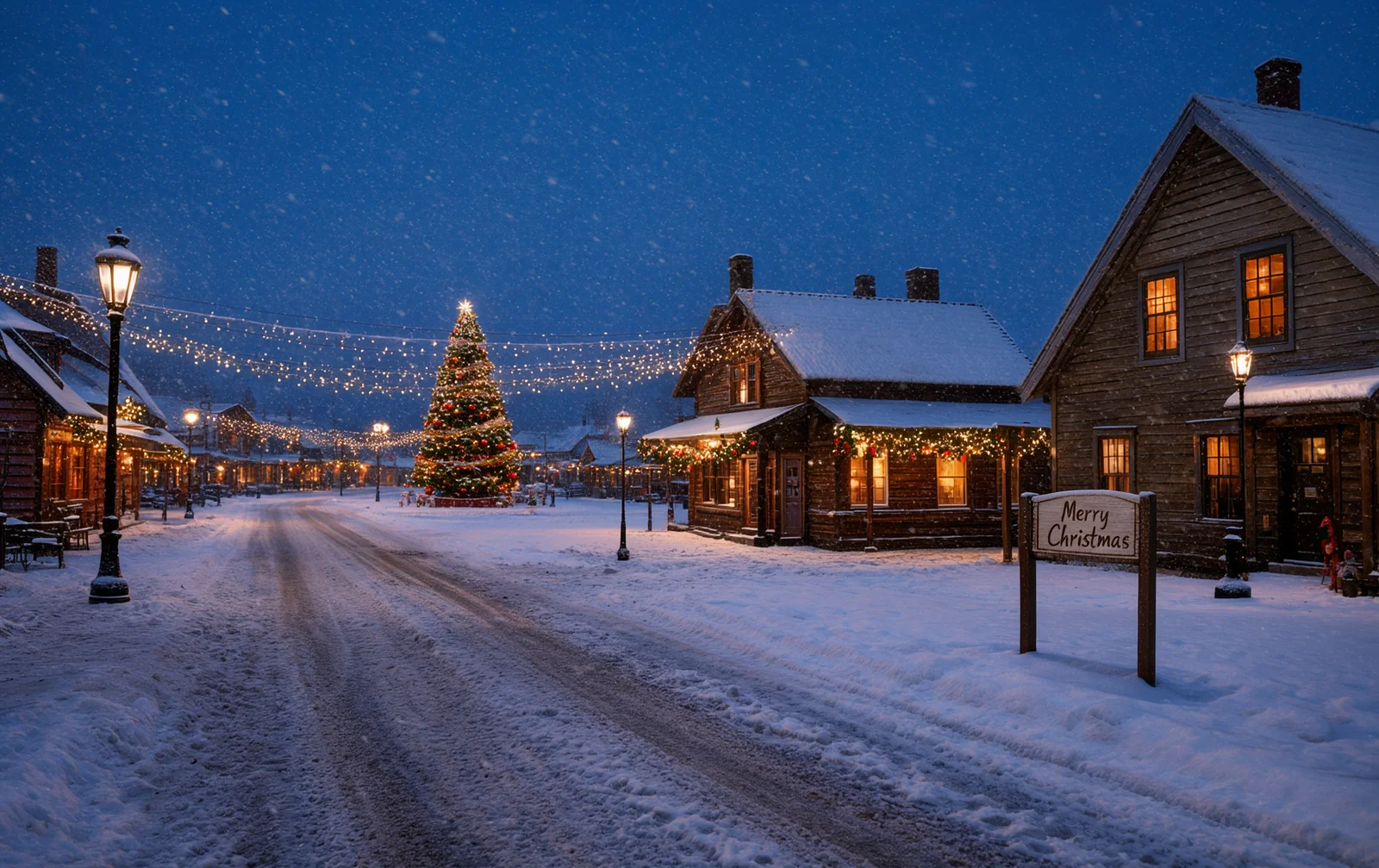
1728×1088, one earlier test run.
| Run | Seed | Time |
|---|---|---|
| Give Thanks | 864806374791918 | 560.9 s |
| Thanksgiving | 283171623447621 | 554.0 s |
| Snowy window seat | 986995460342718 | 586.1 s |
The prompts for these three runs, exactly as submitted:
A vertical photo-realistic photograph. A rustic wooden table in warm afternoon light, with a small pumpkin, a few dried maple leaves in red and orange, and a lit candle in the lower part of the frame. In the middle of the frame, elegant hand-lettered cursive text that reads the words Give Thanks, in soft cream white, large and clearly legible, with a subtle shadow. Warm golden-hour color palette, shallow depth of field, soft film grain. The top third of the frame is clean, softly blurred warm background, left empty. No people, no logos, no other text.
A vertical minimalist flat illustration. A smooth gradient background from burnt orange at the bottom to warm cream at the top. A few simple falling maple leaves and oak leaves in terracotta, mustard and deep brown, scattered across the lower two thirds. In the middle of the frame, bold clean serif text that reads the words Thanksgiving, in deep brown, large, centered, high contrast against the background. The top third of the frame is a plain, uncluttered area kept empty. No people, no logos, no other text.
A vertical photo-realistic photograph of a cozy window seat on a snowy evening: a wide wooden windowsill with a folded cream knit blanket and a steaming ceramic mug, a small candle glowing beside it. Outside the frosted glass, soft snow falls over blurred pine trees and distant warm yellow house lights. Soft diffused blue-grey twilight mixed with warm candle glow, small ice crystals on the glass corners, calm and quiet mood, shallow depth of field, film-like grain. The still life sits in the lower middle of the frame, fully inside the frame, and the top third is a clean, softly blurred snowy window area left empty. No people, no text, no logos.
Short English text rendered correctly in all five phrases we tried: OPEN LATE, Merry Christmas, Books and Tea, Give Thanks and Thanksgiving. We write the text in the prompt as the words Give Thanks, without quotation marks.
This is a small sample: one seed per phrase and short text only. We still check the spelling of every image by eye.
Problems we ran into
Float8_e4m3fn not supported. The w4a8 prompt upsampler fails on Apple's MPS backend with this error. Moving it to the CPU works but is far too slow to use. We removed the upsampler nodes from the workflow, so the prompt has to carry all the detail itself: light, materials, composition, and which part of the frame stays empty.- The same error after adding
--gpu-only. Launching ComfyUI with global flags such as--gpu-onlybrought the Float8 error back. We leave the launch flags alone. - Large sizes fail late. On MPS the attention tensor has a hard size limit (INT_MAX). A 2560×1600 image failed only after more than 20 minutes of work. Work out width ÷ 16 × height ÷ 16 before you queue a job.
- Memory pressure. The system can kill ComfyUI if other heavy tasks run at the same time. We run one image at a time and keep the machine otherwise quiet.
What we have not tested
- 30 steps against the 50 steps the guide suggests for the base checkpoint.
- The distilled checkpoint, which should be much faster at 4 to 16 steps.
- Other Macs and less memory than 64 GB.
- Importing the JSON through the ComfyUI interface instead of the API.
Takeaways
- Plan for about 10 minutes per phone-size image and run one at a time.
- Check width ÷ 16 × height ÷ 16 before queueing; stay under about 9,000 on MPS.
- Use the int8 text encoder, type
flux3, and leave the global launch flags alone. - Short, large text renders well, but always check the spelling.